Comments Off on Scripting a One-Touch Lockdown: Emergency Network Decoupling
One-Touch Lockdown Scripts: Hardening Linux Network Perimeters via nftables
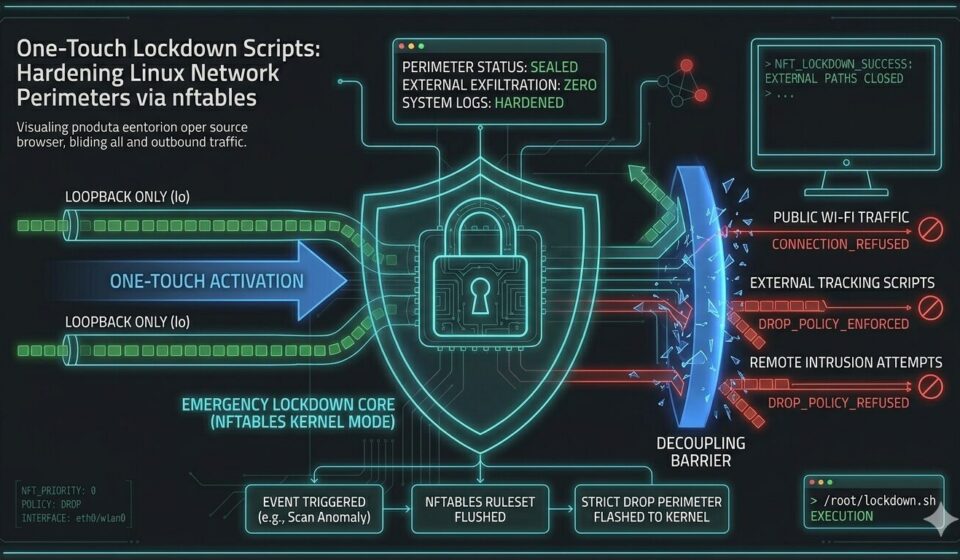
True network sovereignty requires an absolute, unyielding fail-safe mechanism capable of running instantly when your local system integrity is compromised. If an unauthorized configuration anomaly is detected during a routine automated network scan, or if your portable workstation is operating on a highly hostile, untrusted public network segment, you need an immediate, deterministic method to completely sever all outbound and inbound external connections. A “One-Touch Lockdown” framework relies on a custom, root-privileged bash script that clears out existing application-level packet rulesets and flashes a strict, uncompromising isolation schema directly into the Linux kernel netfilter architecture using the native nftables processing subsystem. This manual containment strategy transforms your active host into an impenetrable digital fortress within microseconds, preventing data exfiltration before malicious background daemons can react to the change.
Relying on user-space applications or complex desktop network managers during an ongoing security incident is an invitation to failure. True defense-in-depth demands that you take command of the underlying packet framework from the iron up. By establishing a hardened local runtime, you prepare your environment to handle targeted network attacks or aggressive remote tracking attempts without sacrificing local kernel stability or losing control of your active system consoles.
The Logic of Total Severance
Many standard commercial “kill-switches” and consumer privacy applications rely on gracefully stopping background daemons, terminating active transport layer connections, or requesting high-level network management tools to drop specific hardware links. If a system becomes unstable during a targeted intrusion, or if local system daemons are compromised by heavy payload execution, these high-level user-space instructions can easily hang, timeout, or fail entirely. An emergency lockdown script must bypass these vulnerable upper application layers completely, dropping network traffic directly at the lowest netfilter hooks within the Linux kernel subsystem itself. To fully understand why high-level software fail-safes fail, operators must conduct a rigorous kill-switch audit to map out how application dependencies introduce latency and vulnerabilities during emergency decoupling routines.
When you drop packets directly at the kernel hook layer, you ensure that the processor refuses to route or acknowledge any inbound or outbound network traffic, regardless of which user-space application initiated the connection request. This level of defense is highly superior to simply configuring firewalls to drop ping requests, because it does not merely hide your device from external diagnostic scans; it completely eliminates the network interface’s ability to communicate with the outside world. Operating at this level means that even if a background service attempts to establish a tracking socket or phone home to a corporate telemetry repository, the underlying netfilter architecture drops the packet before it ever reaches your physical network interface controller card.
The Emergency Bash Script
Below is the complete technical layout for an executable shell script designed to safely flush current active routing rules and enforce a zero-throughput perimeter across your entire network stack:
#!/bin/bash
# Emergency Network Lockdown Script
# Path: /root/.security/lockdown.sh

NFT="/usr/sbin/nft"

if [ "$EUID" -ne 0 ]; then
  echo "[-] Critical Error: This emergency script must be executed with root privileges."
  exit 1
fi

echo "[!] Initiating immediate network lockdown..."

# 1. Flush existing rulesets to prevent conflicting overrides
$NFT flush ruleset

# 2. Re-create a clean filter table
$NFT add table inet filter

# 3. Establish absolute drop policies for all core traffic hooks
$NFT add chain inet filter input { type filter hook input priority 0 \; policy drop \; }
$NFT add chain inet filter forward { type filter hook forward priority 0 \; policy drop \; }
$NFT add chain inet filter output { type filter hook output priority 0 \; policy drop \; }

# 4. Permit loopback only (internal system stability)
$NFT add rule inet filter input iif lo accept
$NFT add rule inet filter output oif lo accept

echo "[SUCCESS] Network perimeter sealed. All external pipes closed."
Deployment and Verification
For this emergency script to remain a reliable and secure utility, it must be stored on your local root filesystem with strictly restricted file permissions, using a chmod 700 configuration owned exclusively by root to prevent unauthorized modification by low-privileged user accounts. When an incident triggers this routine, it leaves the local machine entirely safe, isolated, and silent, allowing you to execute comprehensive host log auditing to neutralize persistent web tracking trails without any risk of remote data exfiltration or continued command-and-control access. Once the perimeter is securely sealed, you can systematically analyze local logs, safely check hardware parameters, and debug your local services within an entirely quiet environment.
Maintaining a hardened local firewall configuration works hand-in-hand with broader system debloating and network hygiene practices. Before deploying an automated fail-safe of this magnitude, it is wise to invest time into identifying intrusive background services and stripping operating system bloat to ensure no hidden processes are running unauthorised network lookups in the background. By minimising your local software footprint down to its necessary core components and preparing deterministic scripts for immediate isolation, you establish a highly resilient and sovereign workstation capable of operating safely within any modern threat environment.
Next Step: To learn how to build automated scripts that proactively monitor your local interfaces for unauthorized connections before a lockdown is required, see our deep-dive tutorial on Automated Network Auditing: Scripting Your Own Perimeter Check.